
Phishing emails are becoming harder to recognise, and even experienced internet users can be caught out. Here’s how to identify suspicious messages, protect your information and avoid becoming a victim.
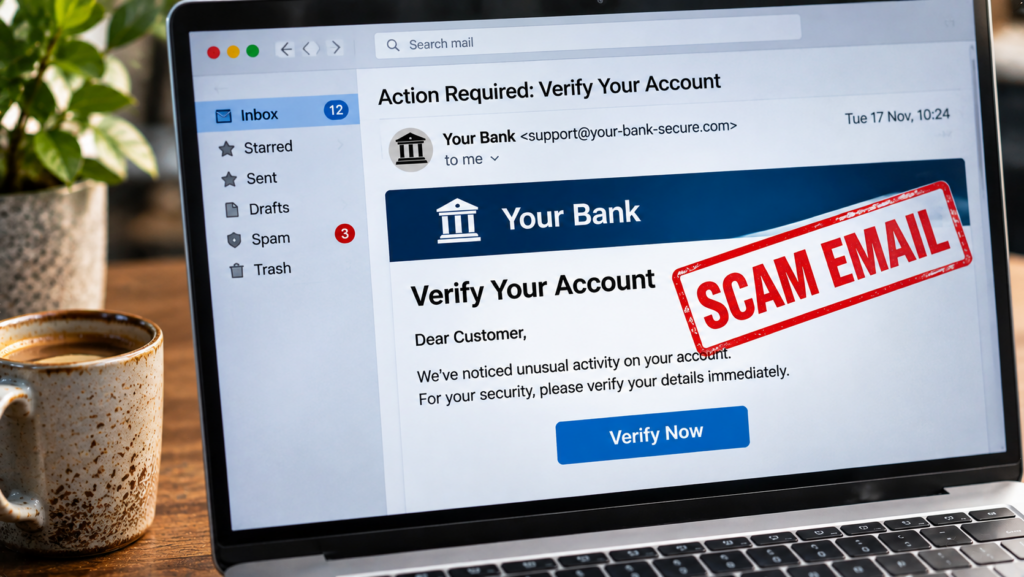
You open your inbox and find an urgent email from your bank. There’s been suspicious activity on your account, and you need to verify your details immediately.
The email looks convincing. The logo is familiar, the language sounds professional, and there’s a button to resolve the problem.
But there’s a catch.
The email isn’t from your bank. It’s from a scammer hoping you’ll click before you think.
This is phishing, one of the most common forms of online fraud. And with criminals increasingly using AI to create convincing messages, spotting the difference between genuine communication and a scam isn’t always straightforward.
Fortunately, a few simple habits can make a significant difference.
What is a phishing email?
Phishing is a type of cyberattack where criminals impersonate trusted organisations or individuals to trick people into revealing sensitive information, downloading malicious files or sending money.
Common examples include emails pretending to come from:
- Banks and financial institutions.
- Delivery companies such as Royal Mail or Evri.
- HMRC and other government departments.
- Microsoft 365, Google or other online services.
- Colleagues, suppliers or company directors.
Some phishing attempts target thousands of people. Others are carefully personalised using information about a particular person or business, a technique known as spear phishing.
The objective is usually the same: convince you to take an action that benefits the attacker.
7 warning signs of a phishing email
1. A sense of urgency
Scammers frequently create pressure by claiming your account will be suspended, a payment has failed or immediate action is required.
Be particularly cautious when an email tries to rush you into making a decision.
2. A suspicious sender address
An email might display the name of your bank while actually coming from an unrelated address.
Check the full email address, not just the sender’s display name.
Remember, though, that sender addresses can sometimes be spoofed or compromised, so a familiar address alone doesn’t guarantee safety.
3. Unexpected links
A message might ask you to click a link to verify your account or update payment information.
On a computer, hovering over a link can reveal its destination. On mobile devices, you may be able to preview it by pressing and holding.
If you’re uncertain, avoid the link entirely and visit the organisation’s website through a trusted bookmark or by typing its known address yourself.
4. Requests for passwords or security codes
Legitimate organisations should not ask you to disclose passwords or one-time authentication codes by email.
If a message requests these details, treat it as suspicious.
5. Unexpected attachments
Be cautious with invoices, delivery notices or documents you weren’t expecting.
Attachments can contain malicious software or lead you towards fraudulent login pages.
If a document appears to come from someone you know but seems unusual, confirm it through another communication channel.
6. Unusual payment instructions
An email claiming that a supplier has changed their bank details deserves additional scrutiny.
This is a common tactic in business email compromise scams.
Always verify changes to payment details using a trusted telephone number you already have, rather than one provided in the suspicious email.
7. Something simply feels wrong
Perhaps the greeting is unusual, the request is unexpected or the message doesn’t sound like the person who supposedly sent it.
Don’t ignore those concerns.
Poor spelling used to be a common warning sign, but modern phishing messages can be grammatically perfect. Professional-looking writing is no longer a reliable indication of authenticity.
How to protect yourself from phishing
You don’t need advanced technical knowledge to reduce your risk.
Start with a few sensible precautions:
- Enable multi-factor authentication (MFA): It adds another layer of protection if your password is stolen.
- Use unique passwords: A password manager can help you create and store strong passwords.
- Keep devices updated: Security updates help protect against known vulnerabilities.
- Use email filtering: Modern email services can identify and block many suspicious messages.
- Verify unusual requests: Contact the organisation independently before sharing information or making payments.
- Report suspicious emails: In the UK, forward suspected phishing emails to report@phishing.gov.uk.
For businesses, staff awareness is particularly important. A single compromised email account can expose customer information, financial records and other systems.
Good cybersecurity practices should combine technical protection with straightforward guidance that employees can understand and follow.
What if you’ve already clicked a phishing link?
First, don’t panic. Clicking a link doesn’t automatically mean your device has been compromised.
What matters is what happened next.
If you entered a password, change it immediately using the genuine website or app. If you’ve reused that password elsewhere, change those accounts too.
If you shared banking information, contact your bank using its official telephone number.
If you downloaded or opened a suspicious file, run a security scan and seek technical assistance if necessary.
If a work account or device is involved, inform your IT administrator promptly.
You can also report fraud or cybercrime through the appropriate UK reporting service.
Final thoughts
Phishing works because it exploits ordinary human behaviour: trust, curiosity, concern and the instinct to respond quickly when something appears urgent.
As AI makes fraudulent messages more convincing, recognising scams by their appearance alone is becoming increasingly difficult.
The most useful habit is also one of the simplest.
When an unexpected message asks you to click, pay, download or share sensitive information, take a moment to verify it independently.
That small pause could prevent a much bigger problem.
Want a hand putting this into practice?
Tell us what you are working on and we will come back with clear, honest advice and a fair quote. No pressure, no jargon.
New to cyber security? Take our free 15-minute course.