
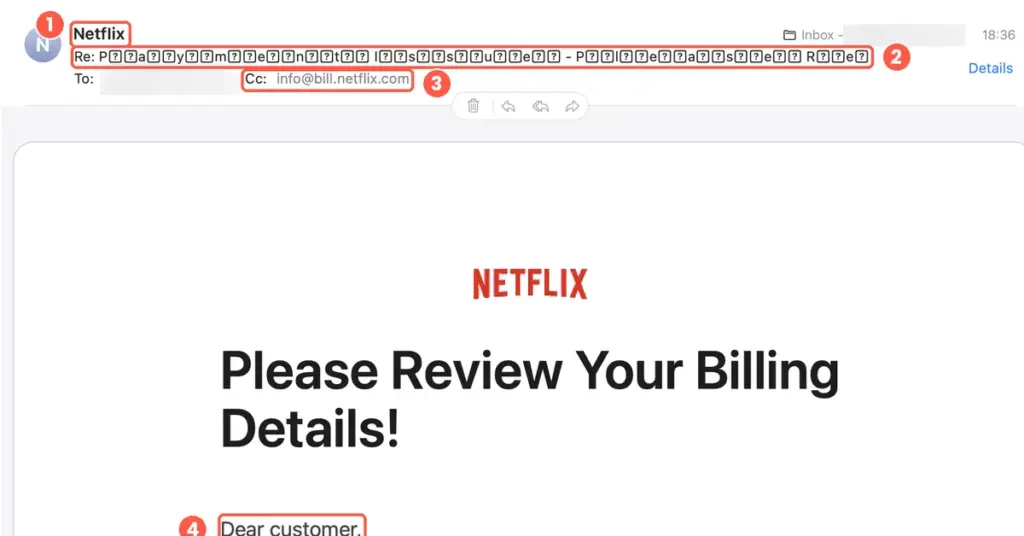
We took a real scam email, left everything exactly as it arrived and marked up the clues. Here are 10 red flags you can learn to spot in seconds, what could happen if you clicked, and what to do if you already have.
Most advice about phishing stays abstract: “watch for suspicious senders”, “beware of urgency”. It’s far easier to learn when you can see the real thing.
The email below arrived in a real inbox this week, claiming to be from Netflix. It says there’s a problem processing your payment and asks you to review your billing details. The logo is right, the layout is clean and the button is the right shade of red. At a glance, it looks legitimate.
It isn’t. It’s a phishing email, and it’s full of giveaways. We’ve blurred the recipient’s email address and left the rest untouched.
The fake Netflix email, with the red flags marked
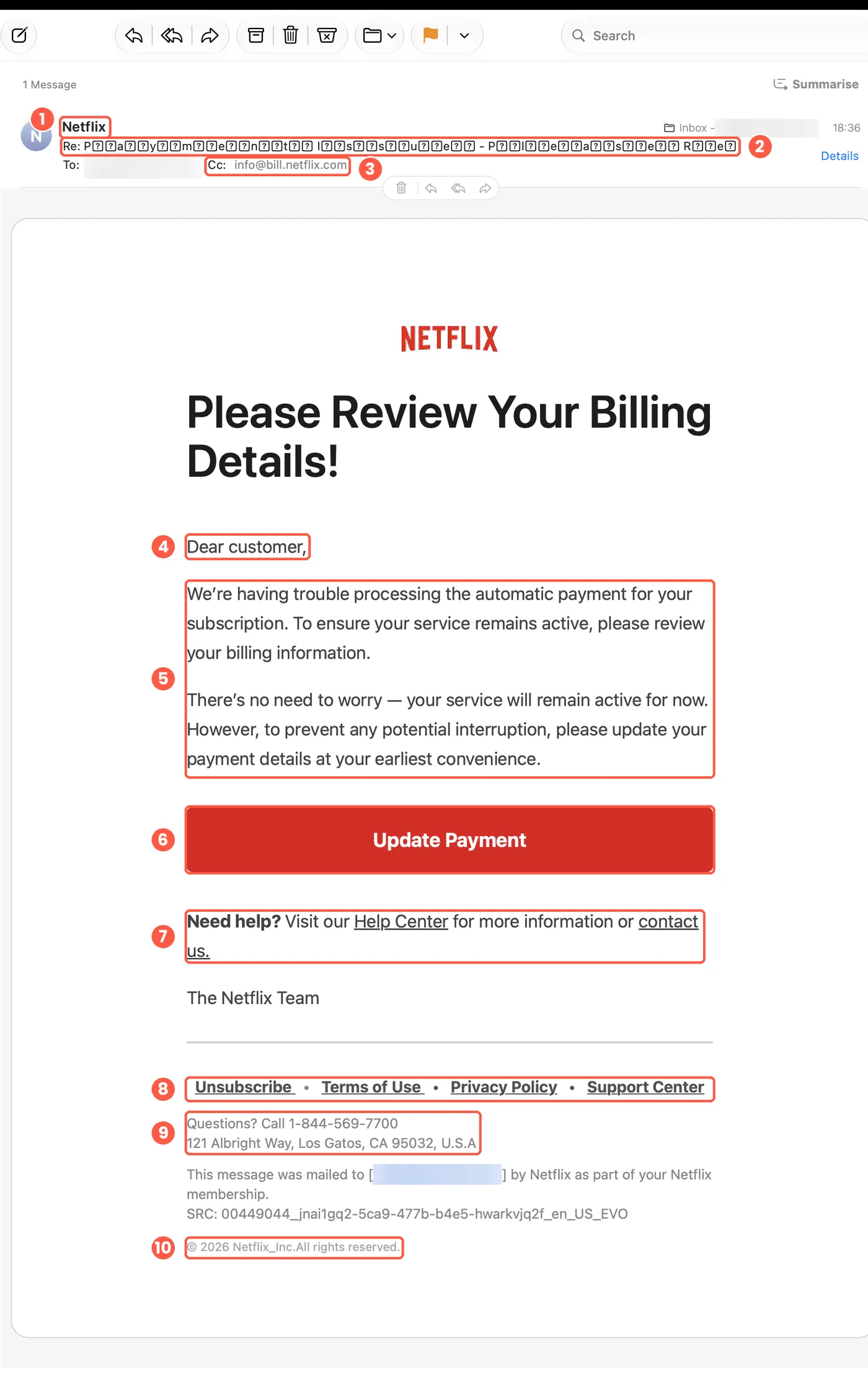
10 red flags in this fake Netflix email
Each number below matches the numbered markers on the screenshot.
1. A sender name, but not the sender
Mail shows only the display name “Netflix”. Anyone can type any display name, so it proves nothing. The real address sits behind it: click or tap the name (or “Details”) and check that the domain is the company’s genuine one, character for character. In this case, the screenshot never shows the real sending address, which is exactly why you should look before you trust.
2. A fake “Re:” and a subject full of junk characters
The subject begins with “Re:”, as if you were replying to something you sent. You weren’t. Worse, every letter is separated by odd symbols (they show as little boxes with question marks here). Scammers insert hidden characters to slip past spam filters that look for words like “payment”. A real company has no reason to do that to its own subject line.
3. A mystery address in the Cc field
The email is copied (Cc) to info@bill.netflix.com. It looks official, but anyone can type any address into a Cc field, and a genuine billing email is sent only to you. It’s there to make the message look more official. Never use “reply all” on a message like this.

4. “Dear customer”
A company that bills you every month knows your name. A generic greeting is the sign of a message sent to thousands of addresses at once. Note too the headline: “Please Review Your Billing Details!” An exclamation mark and a vague request, with no amount, date or account detail.
5. Pressure, wrapped in reassurance
“There’s no need to worry — your service will remain active for now.” Then the nudge: update your details to “prevent any potential interruption”. It’s a soft threat, designed to make you act quickly without checking your actual account. If your payment really had failed, you would see it when you log in.
6. The “Update Payment” button
This is the whole point of the email. The button says one thing; the link behind it can go anywhere, and the screenshot gives no way to tell. On a computer, hover over it to preview the address in the corner of your screen. On a phone, press and hold. If you can’t see exactly where it leads, don’t click.
7. More links, and any of them could be fake
“Help Center” and “contact us” are underlined links too. Scam emails often mix in a few genuine links to look convincing, and a fake “contact us” link can lead you to the scammers’ own page or phone number. Treat every link in the message as unsafe, not just the big button.
8. The footer links: Unsubscribe, Terms, Privacy, Support
Footers feel like proof of legitimacy, but they are the easiest part to copy. Be especially wary of “Unsubscribe”: on a scam email, clicking it can simply confirm to the sender that your address is live and read by a human.
9. Real-looking details that prove nothing
A phone number, a head-office address in California and a reference code all make it look official. But real addresses and logos are easy to copy from the genuine website, and a phone number in an email may not be the company’s own. Never call a number from a suspicious email. Look the company up yourself.
10. Sloppy small print
“Netflix_Inc.All rights reserved.” has an underscore where a comma or space should be, and no space after the full stop. Large companies proofread their templates. Small mistakes like this are common in scam emails, but their absence doesn’t make an email safe. Today’s scammers (and AI tools) can write flawlessly, so never rely on spelling alone.
Where would the “Update Payment” button have taken you?
We didn’t click it, and you shouldn’t either. Buttons like this almost always lead to a convincing copy of the real website, built to collect whatever you type into it.
https://netflix.com.billing-update.example/login
It starts with “netflix.com”, but that is only a sub-section of the address. The real website is the part that sits just before the first single slash: here, billing-update.example. Scammers pad the front of the address with a trusted name and hope you stop reading.
What can criminals do if you click?
Clicking a link is not always the disaster people fear, but it can be the first step in one. Depending on what the page asks for, and what you give it, scammers can:
- Steal your login. That means your account, and every other account where you reuse the same password.
- Capture your card details (number, expiry date and security code) and use them for fraudulent payments.
- Collect personal information such as your name, address and date of birth, to use in identity fraud or follow-up scams.
- Install malware if a page prompts you to download a file or “update” something.
- Mark your address as active, so you receive more scam emails, texts and phone calls.
How to check a suspicious billing email safely
- Don’t click anything in the email, including “Unsubscribe”.
- Go to the service yourself. Open the app or type the address into your browser, then check your account and billing page. If there’s a real problem, it will be there.
- Check the real sender address behind the display name.
- Preview links without opening them: hover on a computer, press and hold on a phone.
- Report it, then delete it. Forward scam emails to report@phishing.gov.uk, the UK’s Suspicious Email Reporting Service run by the NCSC. Scam texts can be forwarded to 7726.
What if you’ve already clicked?
Don’t panic. What you do next depends on what you did on the page:
- You clicked but entered nothing: you’re unlikely to need to do anything more, but stay alert to unusual account activity.
- You typed in a password: change it straight away on the real website (type the address yourself), change it anywhere else you used it, and switch on two-step verification.
- You gave card details: contact your bank immediately so they can cancel or freeze the card.
- You opened a file or installed something: run a full antivirus scan on that device.
- You lost money or think you’ve been hacked: report it to Report Fraud (formerly Action Fraud) on 0300 123 2040 if you’re in England, Wales or Northern Ireland, or to Police Scotland on 101.
The NCSC’s guidance on reporting scam emails covers each of these steps in more detail.
The 60-second test
Before you click anything in an unexpected email about money, ask:
- Does the real sender address match the company exactly?
- Does it use my name, or just “Dear customer”?
- Is it rushing me or hinting at consequences?
- Do I know where the link really goes?
- If I open the app or website myself, does the same problem show up?
If any answer worries you, close the email and check directly. Nothing in your inbox is so urgent that it can’t wait 60 seconds.
Protect your business as well as yourself
The same tricks are used against small businesses every day, with fake invoices, fake supplier details and fake Microsoft 365 logins. Our general guide to how to spot phishing emails covers the warning signs in more depth, our free cyber security course for small businesses helps your team spot them before they click, and our free password generator makes it easy to give every account its own strong password.
Want help securing your website, email and accounts? See our cyber security services or get in touch.
Netflix and the Netflix logo are trademarks of Netflix, Inc. Bright Choice Marketing is not affiliated with Netflix. The screenshot is shown for educational purposes, with the recipient’s email address blurred.
Want a hand putting this into practice?
Tell us what you are working on and we will come back with clear, honest advice and a fair quote. No pressure, no jargon.
New to cyber security? Take our free 15-minute course.